ShareAspace D2M RFI processes
Overview
This capability allows users to request and receive structured information from other users in an auditable manner.
A typical usage is when a system integrator procures parts from a supplier and requires the supplier to provide information associated with the part, such as safety certificates, performance specifications, installation drawings.
Summary of features
The following features are supported by this capability:
- Identify information set templates that are structured requests for information
- Identify information set section templates that are the structuring component of an information set template
- Identify an information set that is the response to a request for information
- Identify structural components of an information set that correspond to the requested information structure
- A generic information gathering process that may be tailored to specific user needs
High level process
The high level business processes for requesting information is shown in the process diagram below.
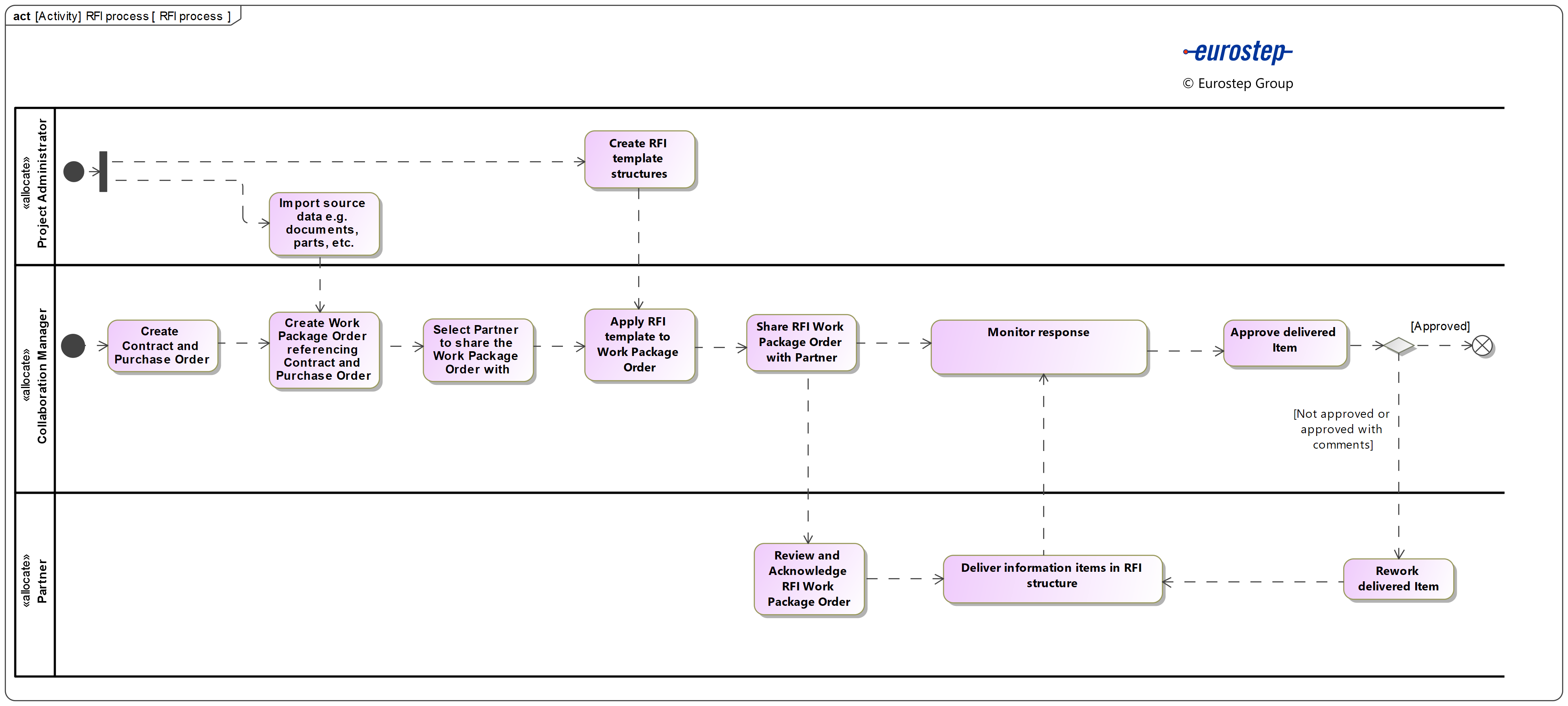
First a set of structured information sets are defined as a RFx templates that will be consistently used by a project when requesting information of a supplier.
The Prime then creates an information request in accordance with a corporate template, detailing what information is requested and when is required to be delivered.
Once an information request has been created the request is shared with a supplier. The supplier acknowledges the request and then provides the information as requested.
The acquired can monitor the provision of the information and expedite the process to ensure that the request is met within the required timescales.
Once a supplier has provided the information, the acquired reviews and approves the delivery or requests rework.
Detailed process
The detailed business process for requesting information is shown below:
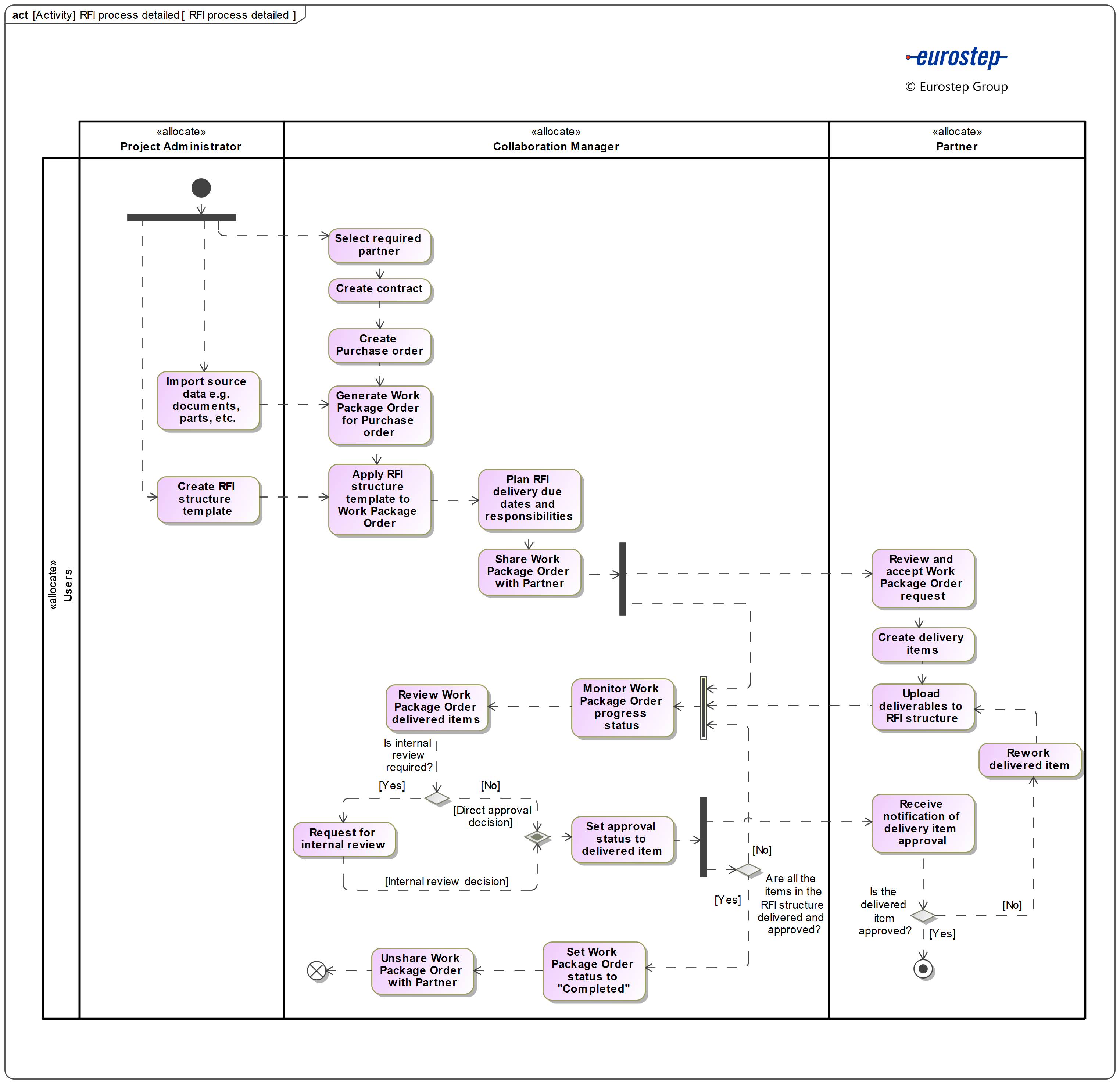
The process is initiated by the Project administrator and the Collaboration manager. Concurrently, the Project administrator creates the required RFI structure and import the source data, e.g. documents, parts, etc. While the Collaboration manager selects the partner from which information will be requested.
The contract is created according to the selected partner. Then, the purchase order is created referencing the previously created contract.
Once the source data is imported by the Project administrator, the Collaboration manager generates the Work package order for the previously created purchase order. Next, the RFI structure template is applied to the Work package order before planning and assigning the delivery dates and people responsible from both parties.
The Work package order is shared with the selected partner after the delivery dates, and responsible people for each RFI section are identified and assigned.
Once the Workpackage order is shared, the partner is notified about it. The partner reviews and accepts the request while communicating with the prime through the messages feature in the work package order module when necessary.
Then, the responsible partner users create the delivery items, upload and attach them to the corresponding RFI structure while the assigned prime users continuously monitor the work package order progress status and review the items as they are delivered. The delivered items meta data is updated by the assigned partner user when required.
The prime user responsible for each delivered item decides to directly approve a delivered item, reject it as not relevant or request for stakeholder approval when necessary. The stakeholder approval process is described in the user guide.
Once an approval decision is made, the prime user set the approval status of the delivered item accordingly and the partner user is notified. If the approval status of a delivered item is set to "Not approved" or "Approved with comments", the responsible partner user reworks the item, makes the old delivery obsolete and delivers a new item or updated version.
Finally, when all the requested items have been delivered and approved, the collaboration manager set the work package order status to "completed" and proceeds to unshare the order with the partner.