Prime: Delivery review
Overview
This section explains delivery review process for the delivered items. The process involves the following activities:
- Monitor the delivery progress of the requested items
- Confirm the relevance of delivered items
Monitor the delivery progress of the requested items
Once a partner has delivered documents in accordance with the request for information under a work package order, a total number of open notifications will be shown on the Notifications module icon for the receiving Participant user:
Clicking on the icon will redirect to the Notifications module. There are two relevant queries, "assigned to me" and "deliveries" if the current user is responsible for the delivered information, "assigned to me" could be used to see the new notifications. Otherwise, "deliveries" shows all the notifications which are created when information items are delivered. Clicking on the “Assigned to me” tab will show a list of notifications assigned to the user. Once selecting a notification, information on it will be shown in the right panel:
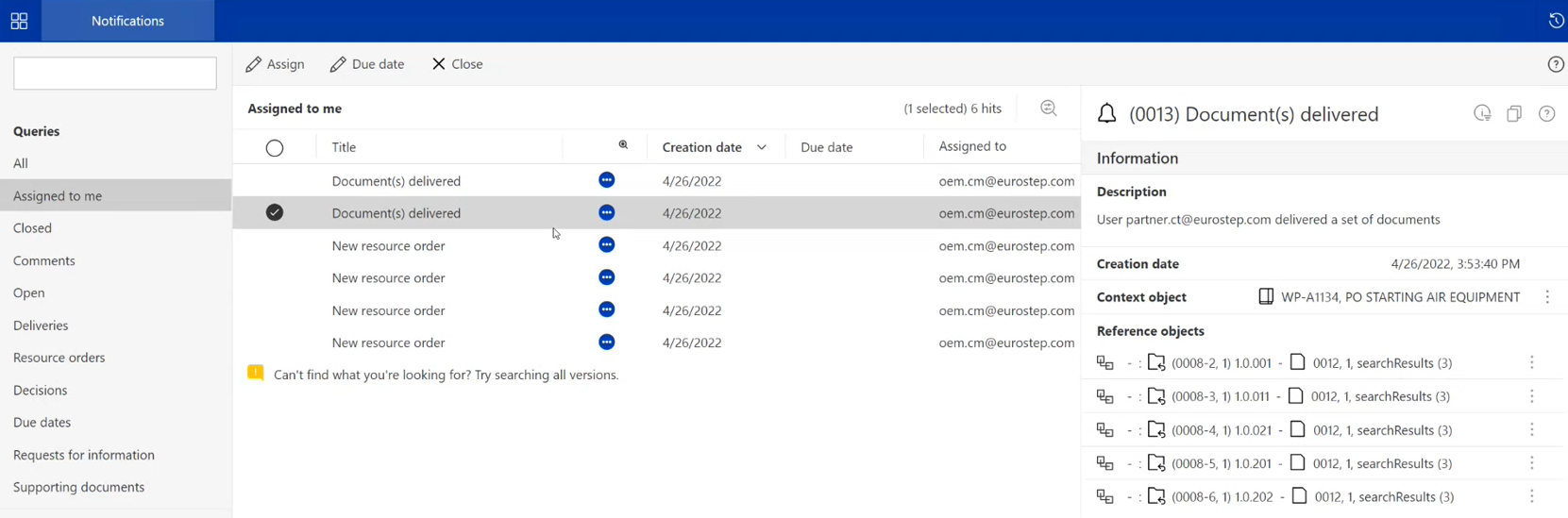
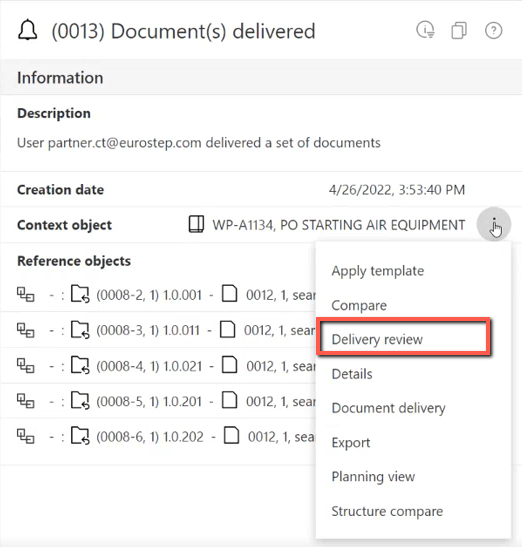
In this example, documents have been delivered to a Work package order. The Work package order can be found in the “Context object”. Clicking on the three dots icon next to the Work package order will enable the user to open the Work package order in the Delivery Review view:
Confirm the relevance of delivered items
Once an item is delivered, the responsible Prime user must check if the item is relevant or not. If the item is not relevant, the Prime user rejects it by setting its status to "not relevant". Only relevant items are considered for approval.
The following video demonstrates the review of documents delivered against a work package order.